Pennyway pennyway

Your money,
your rules.

Pennyway is a private, self-hosted personal finance manager. Automatically sync your bank accounts, track spending with smart rules, manage invoices from Gmail, and get AI-powered insights — fully encrypted on your own machine.

Free to use  ·  No credit card required for registration
Your data never leaves your device
Why does it matter that your data stays private?

Everything you need.
Nothing you don't.

A desktop app that gives you a clear, real-time picture of your finances without ever touching a cloud server.

🏦

Automatic Bank Sync

Connect your bank accounts and credit cards. Pennyway scrapes your transactions automatically each morning so your data is always up to date.

🤖

AI-Powered Insights

Get smart spending analysis powered by AI. Use a Pennyway managed AI key, or bring your own Google Gemini key. Understand where your money goes and spot trends across months with a single click.

⚙️

Smart Rules Engine

Create flexible rules to automatically categorize, rename, and tag transactions as they arrive — so your reports always make sense.

🐷

Piggy Bank Goals

Set savings goals and track your progress over time. Visualize how your spending habits affect your long-term financial targets.

📅

Future Billing Planner

See upcoming scheduled payments and predict your end-of-month balance before it happens. No more surprise overdrafts.

📊

Rich Dashboard

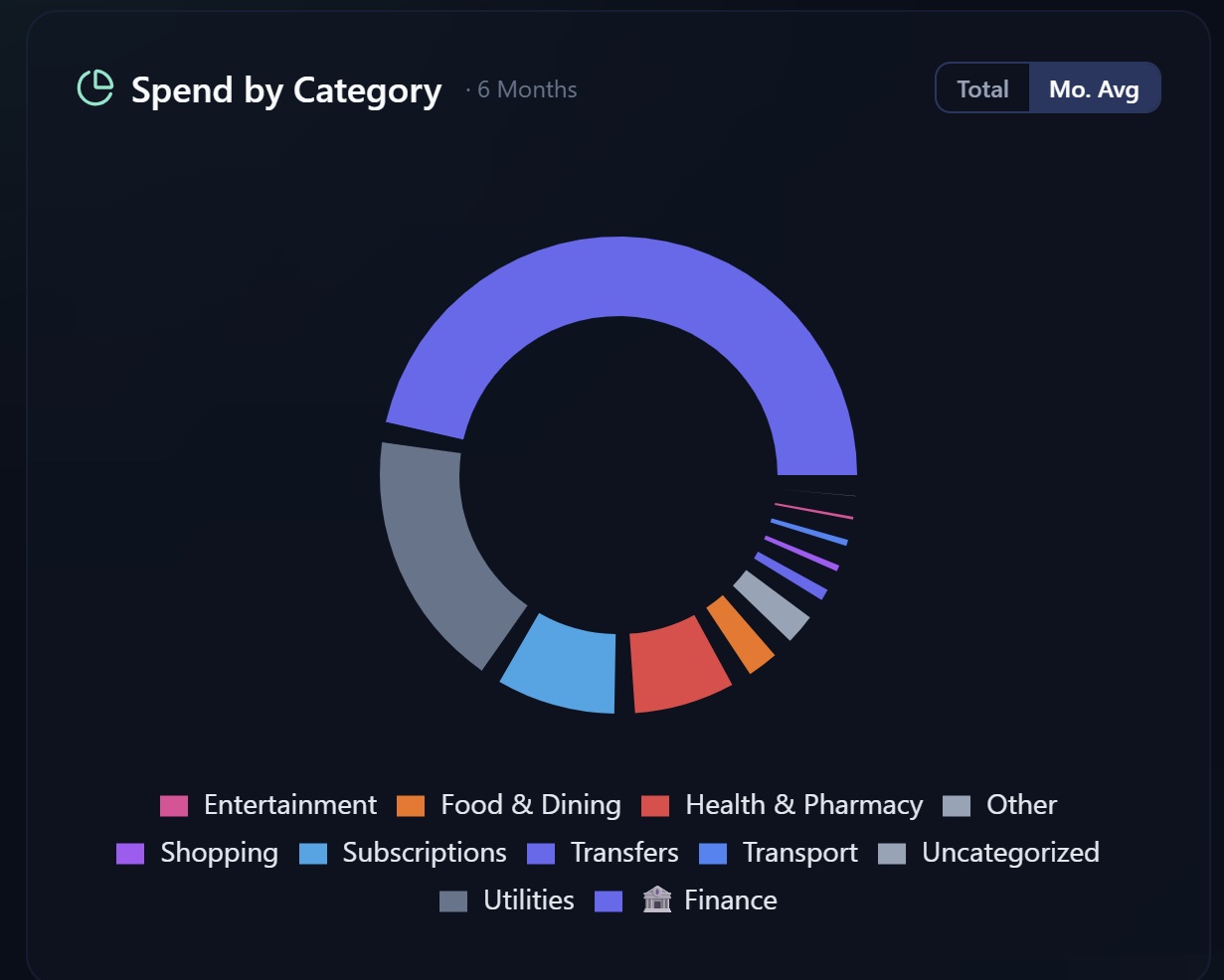
A beautiful overview of your net worth, spending by category, income vs. expenses, and monthly trends — all in one place.

Solving the messy parts
of personal finance.

Beyond tracking — Pennyway handles the things other apps ignore.

🧾
Invoice Management

Your invoices, fully under control.

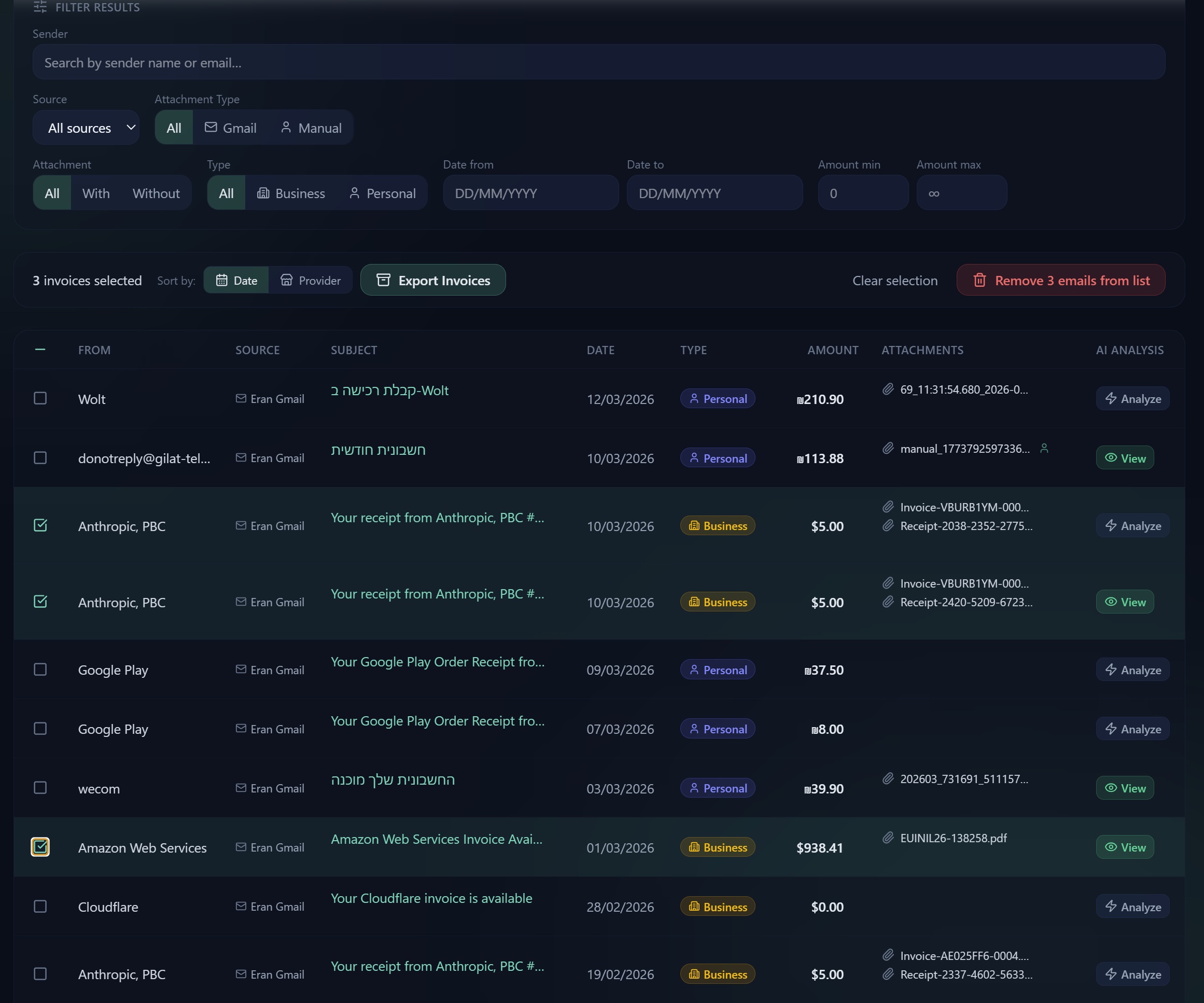
Pennyway scans your Gmail inbox and automatically extracts every invoice and receipt — no manual forwarding needed. AI classifies each one as Business or Personal, adds AI insights, and you can manually add any invoices that didn't come by email. When it's time to close the books, filter by date, sender, type, or amount and export a clean bundle to hand straight to your accountant.

📥 Auto-pull from Gmail 🤖 AI insights & categorization ➕ Add invoices manually 📦 Export bundles for accountant
Task Management

Never lose track of a suspicious charge again.

Spot something odd in your transactions? Create a task right from the transaction or invoice row — it stays linked to that item so you can follow up later. Set a due date, track progress through three stages (Created → In Progress → Completed), and add timestamped notes as you investigate. The sidebar shows live counts of open and overdue tasks, and the dashboard warns you when deadlines are approaching.

🔗 Linked to transactions & invoices 🗓️ Due dates & overdue alerts 💬 Timestamped notes per task 📊 Live sidebar badge
🔄
Subscription Tracking

Stop paying for things you forgot you signed up for.

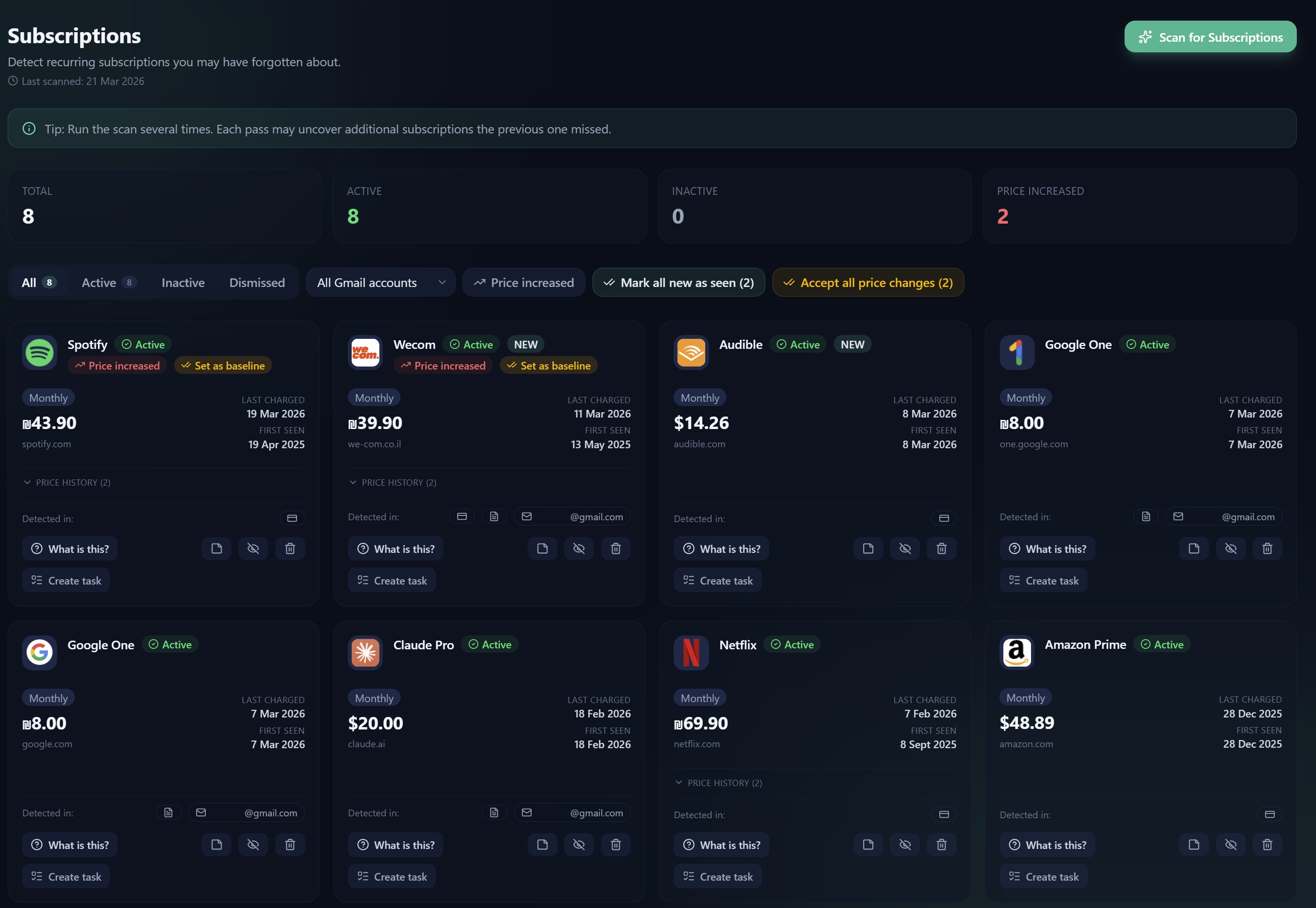
Pennyway scans your transactions and Gmail inbox and uses AI to automatically detect recurring subscriptions — from streaming services and SaaS tools to gym memberships and annual renewals. Each detected subscription shows its billing frequency, latest price, and detection source. Price changes are flagged instantly so you always know when a service quietly raises its rate. The dashboard gives you a live monthly cost estimate broken down by currency.

🤖 AI-powered auto-detection 📈 Price change alerts 💳 Monthly cost by currency 📧 Detects from Gmail & invoices
📧
Gmail Intelligence

Finally know what that charge actually was.

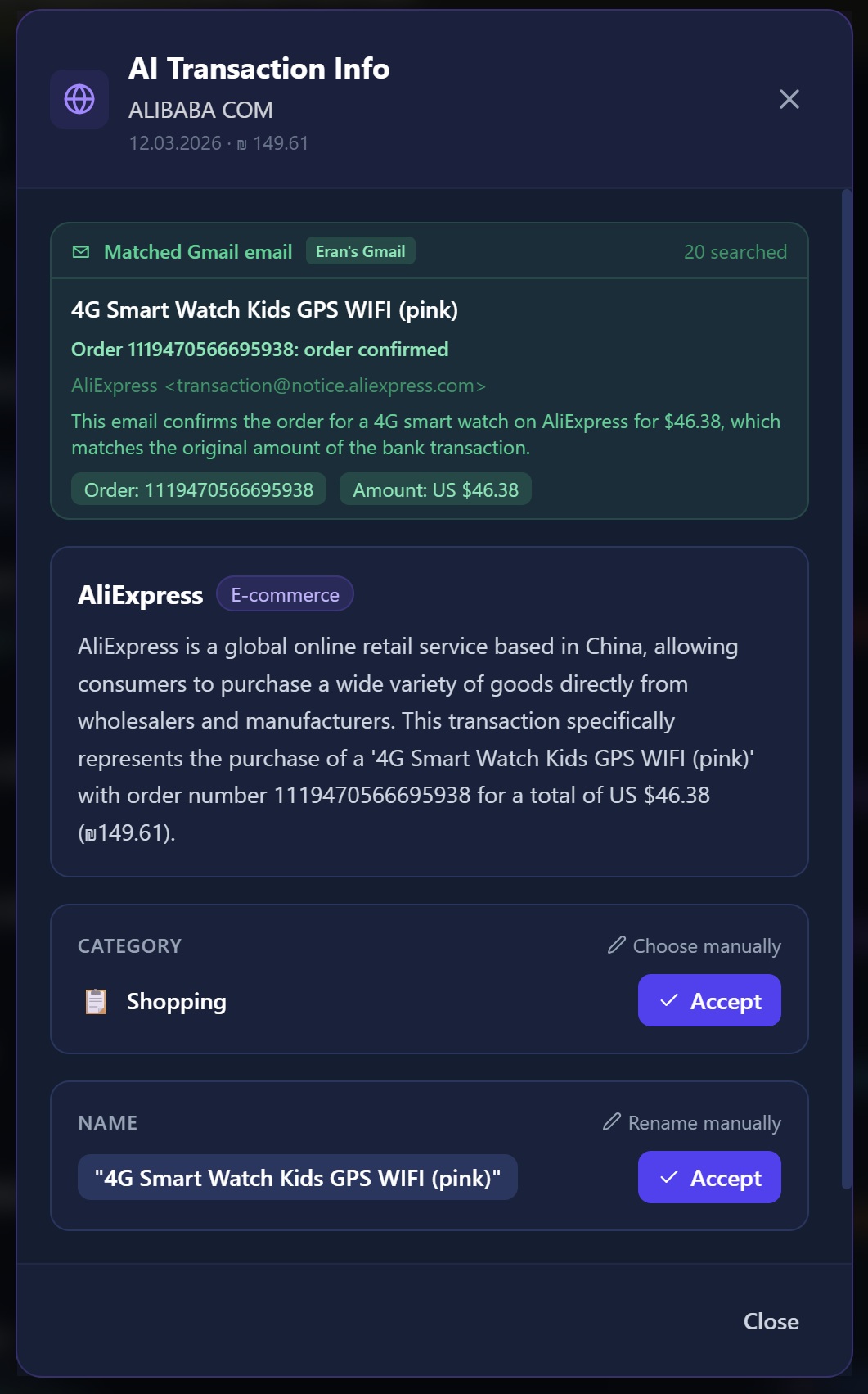
Ever stared at "AliExpress Purchase — ₪47.30" and had no idea what you actually bought? Pennyway can connect to your Gmail and automatically match transactions to the real order confirmations and receipts in your inbox — so every line item tells the full story, not just a merchant name.

📱
WhatsApp Notifications

Your finances, delivered to your WhatsApp.

Get daily and weekly spending summaries, large transaction alerts, and AI-generated financial insights — all delivered straight to your WhatsApp. Pennyway uses the WhatsApp Business API to send you opt-in notifications, so you always know where your money is going without even opening the app.

📊 Daily & Weekly Summaries 🔔 Large Transaction Alerts 🤖 AI Financial Insights

A look inside Pennyway

Real screens from the app — no mockups.

Dashboard — Spending by Category
📊  Dashboard — Spending by Category
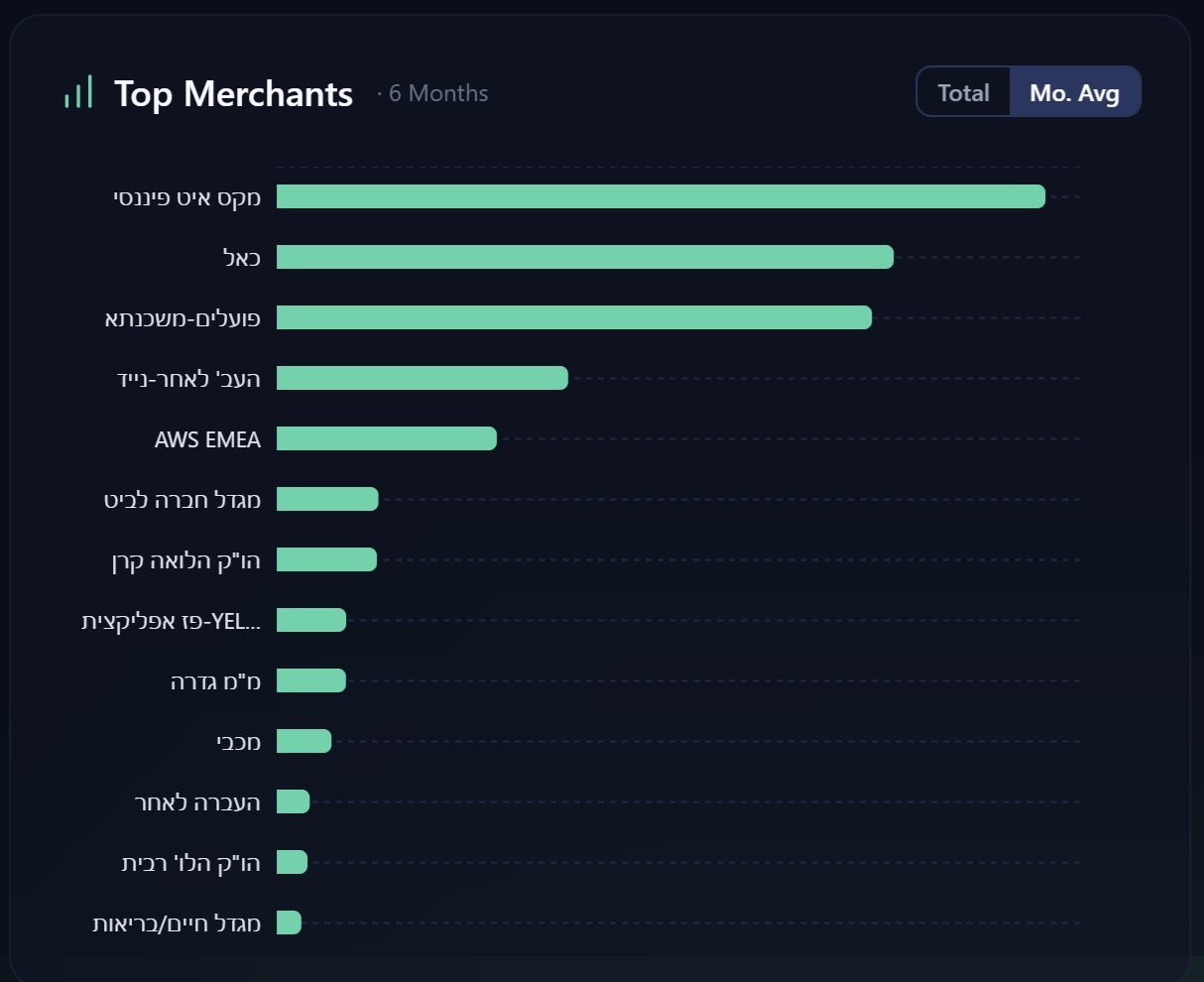
Dashboard — Top Merchants
🏪  Dashboard — Top Merchants
AI Transaction Info
🤖  AI-Powered Transaction Info
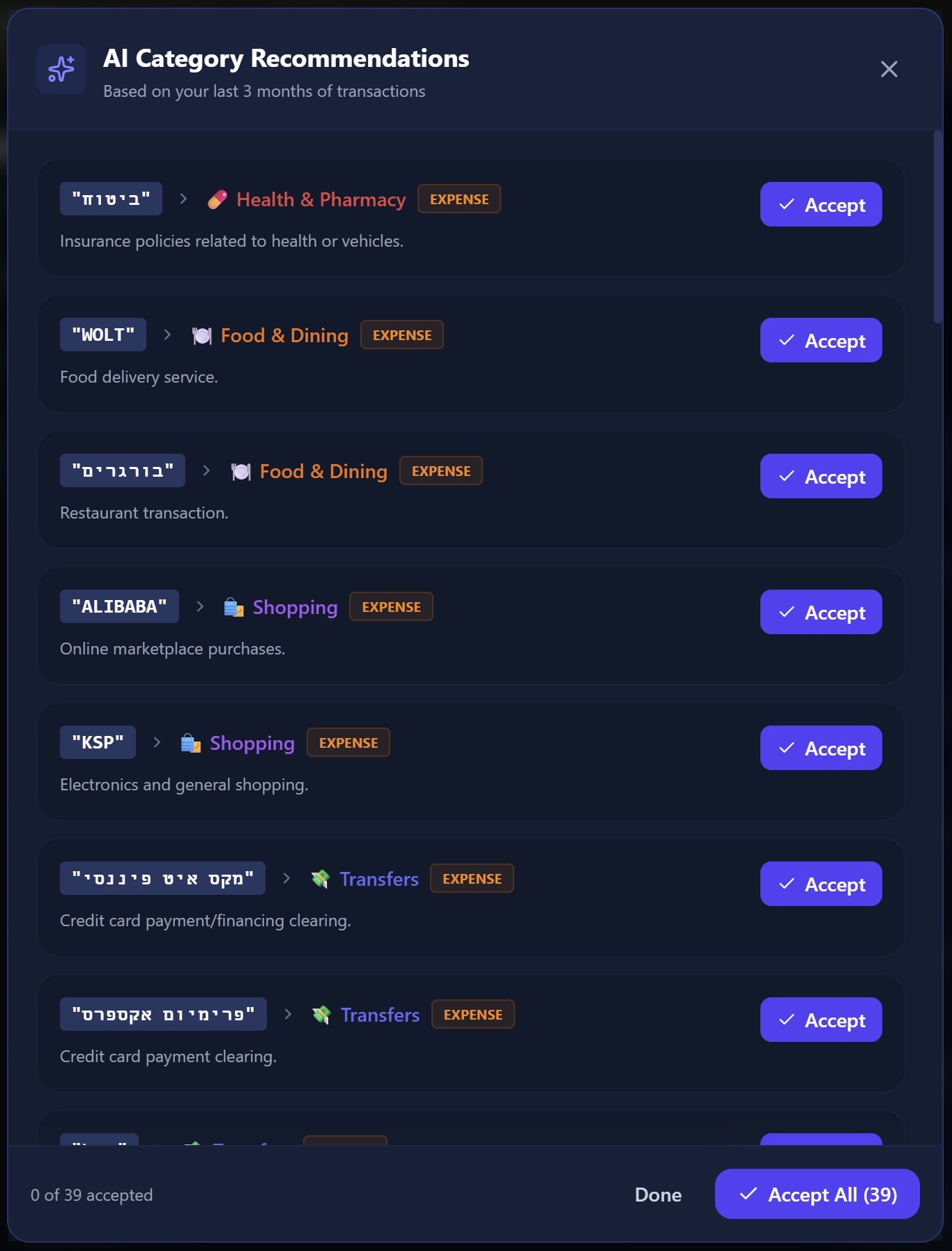
AI Category Recommendations
✨  AI Category Recommendations
Invoice Management — filter, categorize and export invoices
🧾  Invoice Management — filter, categorize & export to your accountant
Subscription Tracker — detect and manage recurring subscriptions
🔄  Subscription Tracker — detect recurring charges, track price changes & monitor monthly costs

Your data stays on your machine.

  • Bank credentials encrypted with AES-256, derived from your password
  • All transaction data stored locally in a SQLite database
  • No data is ever uploaded to Pennyway servers
  • Email used only for account verification (OTP) — never for marketing
  • Your encryption key never leaves your machine

How we use your email

Pennyway sends exactly one type of email: a one-time verification code (OTP) when you register your account. This confirms you own the address before we link it to your installation. We send no newsletters, no promotions, and no notifications of any kind. You can read our full Privacy Policy for complete details.

🔓 Read what happens when cloud finance apps fail their users

Download Pennyway

Free to download and use. Register with your email to get started — no credit card required.

🪟 Windows 🍏 macOS 🔒 AES-256 Encrypted 🆓 Free

Found a bug or have a suggestion? Send a feedback through the app,
or open an issue on GitHub

You might see a warning — that's normal.

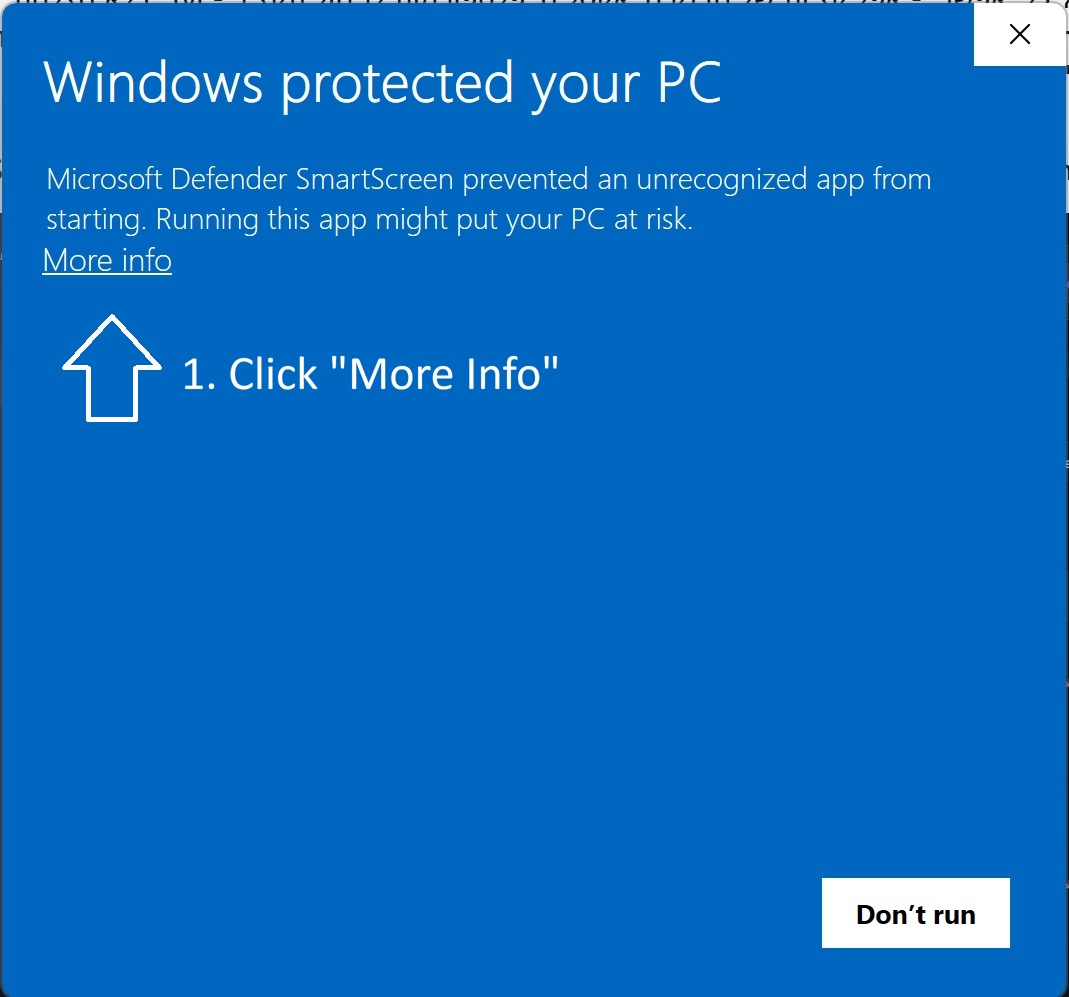
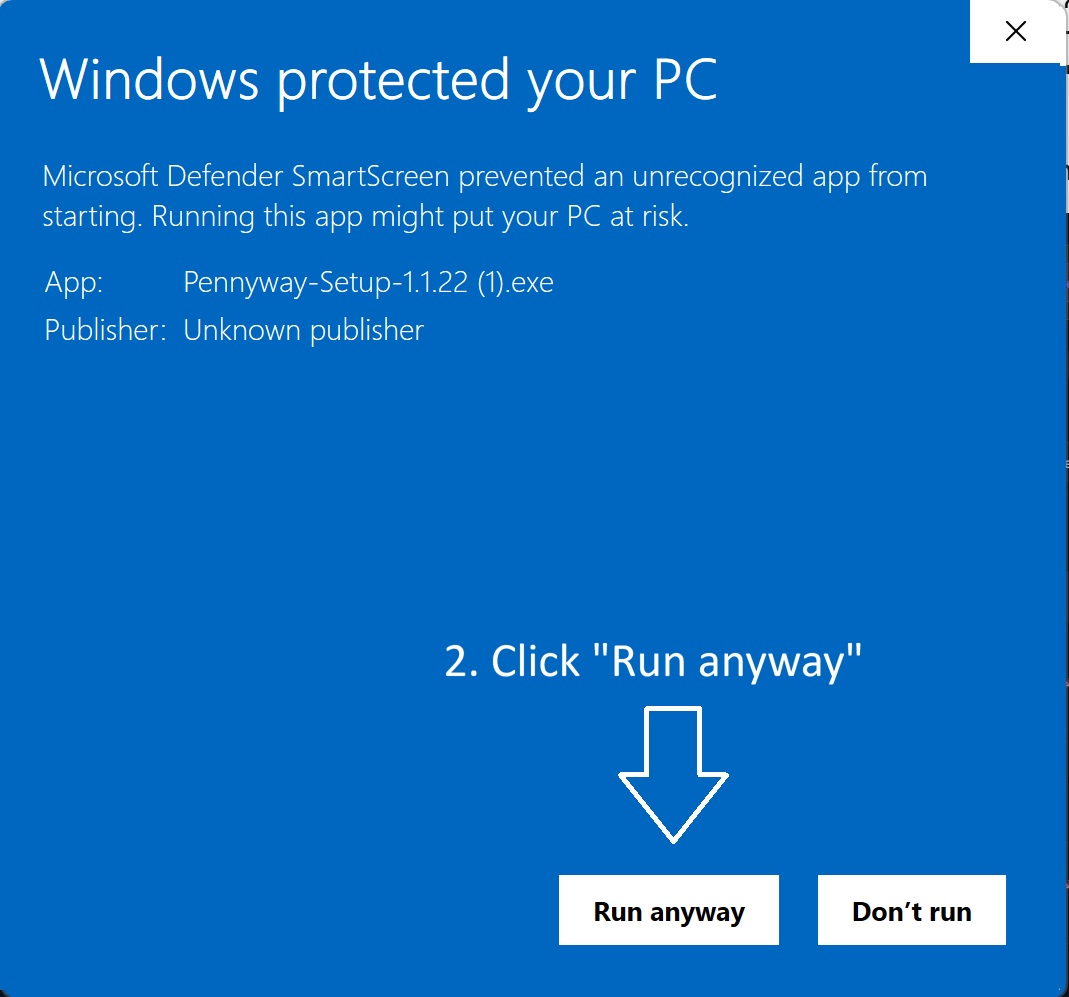
Because Pennyway is a personal project without a paid code-signing certificate, your OS (Windows SmartScreen or macOS Gatekeeper) may flag the installer as "unrecognized." The app is completely safe. For Windows, just follow these two steps (follow a similar procedure on Mac):

Step 1 — click More info on the SmartScreen dialog
1Click "More info" on the blue dialog
Step 2 — click Run anyway
2Click "Run anyway" to start the installer

Why does this happen?  Code-signing certificates cost hundreds of dollars per year. As a free personal project, Pennyway skips that expense — the warning is expected and the app is safe to run.